help
Show the full CLI overview. Aliases: -h, --help.
fez help
No additional flags.
A practical guide to creating servers, launching projects and keeping your local work running.
Fez creates named Docker servers, each with its own services and data. Projects live on a server with a shared gateway which gives each project a local .testdomain address and local HTTPS.
| Requirement | Before installing |
|---|---|
| Operating system | macOS is the currently verified host environment. Linux and Windows through WSL2 still need Fez-specific end-to-end validation; native PowerShell is not a supported CLI environment. |
| Docker | A running Docker installation with Compose v2 and Linux-container support. Meet Docker's current host requirements: macOS, Linux, Windows. Docker support on an OS does not by itself establish support for Fez. |
| Memory & storage | Plan for 8 GB or more of host RAM and 20 GB of free SSD(preferred) space. Allocate 16 GB RAM if planning on running multiple servers. These are provisional recommendations, not benchmarked minimums. Allow additional space for images, databases, projects and backups, and allocate sufficient resources to Docker. These can be set on the Docker Desktop settings page under 'Resources'. |
| Tools | Bash, Python 3.9+, Git, curl, OpenSSL and mkcert available on PATH, alongside Docker and Compose; PHP and Composer will run inside docker containers. You should install Homebrew first. It'll make installing everything else much easier. |
| Workspace | A writable local directory shared with Docker Desktop. Keep the full Fez directory together in a single directory as Fez depends on its sibling CLI, catalog and template files. |
| Network & permissions | Internet access for initial downloads, free host ports, permission to use Docker, and authorization for certificate trust and host DNS changes. |
Download and Install Docker Desktop. Verify installation with the docker compose version command. You also need Bash, Python 3.9+, Git and mkcert installed. Follow the guides below:
python3 --version Obtain the Fez source from its published distribution, extract or clone it into a permanent local folder, and open a terminal there. Run fez doctor before provisioning; it checks the local environment but does not certify every platform.
A formal public release URL and broader host certification are still pending.
On a fresh checkout, copy .env.example to .env cp .env.example .env. Replace all CHANGE_ME_LOCAL_ONLY passwords with strong values of at least 12 characters. Keep an existing configured .env.
fez available on PATH (optional)From the Fez root, run:
mkdir -p "$HOME/.local/bin"
ln -s "$PWD/bin/fez" "$HOME/.local/bin/fez"
export PATH="$HOME/.local/bin:$PATH"fez available for your user account. A symbolic link is created rather than moving the entry point out of the project. For future terminals, add export PATH="$HOME/.local/bin:$PATH" once to your shell startup file: ~/.zshrc for zsh or ~/.bashrc for interactive Bash (on macOS, ensure ~/.bash_profile sources it). Open a new terminal and check command -v fez. If a link already exists, inspect it before replacing it. Update the link if you move the Fez folder.
fez version. With this step completed, you can run Fez from any directory. E.g. fez server:list. Without it you have to run ./bin/fez server:list from the Fez root directory, or use its absolute path if in another directory. All subsequent examples in this guide assumes this step has been completed. Finally, run the commands below to verify all systems go!
fez doctor
fez catalog:check
fez catalog:list
fez doctor checks for your local .env file and docker availability. fez catalog:check checks for the service catalog ensuring all schemas, references and dependencies are valid. fez catalog:list prints out the exhaustive list of all Fez services and their current status. Use unused names and free ports. This example assumes another local stack (or docker service) is already using ports 80/443, so sets the gateway ports to 8088/8443 for http/https respectively.
fez server:create demo --services apache mysql --internal-only --port apache=8089
fez gateway:setup --http-port 8088 --https-port 8443
fez project:create hello --type laravel --server demo --database mysql
fez gateway:trust
fez gateway:dns --apply
fez project:diagnose hello
Open https://hello.test:8443/. Trust and DNS setup can request operating-system authorization. Edit your application in projects/apps/hello/.
demo as a server and hello as a Laravel project. Substitute for your own names. You can run the commands individually if prefered; later sections in this guide will include more commands including how to stop services and accesing the admin dashboard. A Fez server is a named local collection of Docker services. Creating one provisions it on you computer; it does not create a cloud machine.
New servers default to the latest stable version of every service. In the dashboard, select a preset, then choose Custom to select individual services and release versions. Choose Exact version for a numeric patch. Review server lists all services and dependencies before you confirm installation.
In the live dashboard, open Create a server → Guided stack builder. Choose Linux → web server → databases/cache → runtime, then review the images and port before creating. PHP, Python, or both can share one named server, with separate project domains. Presets remain available as shortcuts.
Debian 12 (Bookworm) is enabled first. Ubuntu, Alpine, CentOS Stream, Rocky Linux and Fedora are marked coming soon until their image recipes pass testing. The Linux choice applies to web/runtime containers; databases and caches retain their upstream images.
fez server:plan studio --os debian:12 --web nginx --runtime php+python --database mariadb --cache redis --internal-only --port nginx=8091
fez server:create studio --os debian:12 --web nginx --runtime php+python --database mariadb --cache redis --internal-only --port nginx=8091 --yes
Repeat --database for multiple engines or omit it for none. For Python-only stacks, use --runtime python and --port nginx-python=8091 (or apache-python). Python starters are minimal WSGI applications: database drivers, credentials and application connections remain your responsibility. Existing servers retain their saved OS and runtime; use a new server to change them.
| Preset | Included services |
|---|---|
lamp-mysql | Apache/PHP, MySQL, Mailpit |
lamp-mariadb | Apache/PHP, MariaDB, Mailpit |
lamp-pgsql | Apache/PHP, PostgreSQL, Mailpit |
lamp-mongo | Apache/PHP, MongoDB, Mailpit |
nginx-php | Nginx/PHP, MySQL, Mailpit |
apache-python | Apache and Python WSGI |
nginx-python | Nginx and Python WSGI |
apache-mixed | Apache, PHP and Python |
nginx-mixed | Nginx, PHP and Python |
Configured service IDs are apache, php, nginx, apache-python, nginx-python, python, mysql, mariadb, postgres, mongo, redis, mailpit, phpmyadmin and pgadmin. Apache/Nginx include PHP automatically; Apache/Python includes its Python service. Use catalog:list to distinguish configured services from planned ones.
fez server:plan demo --stack lamp-mysql --add redis
fez server:create demo --stack lamp-mysql --add redis --internal-only --port apache=8089
fez server:info demo
The plan validates configuration without creating resources. Alternatively use --services apache mysql redis. Interactive creation can offer a preset chooser. server:new is an alias for server:create.
Flagging prts as --internal-only hides database/cache host ports. However, mail and database administration interfaces will continue to remain on loopback. Use --port SERVICE=HOST_PORT to choose free published ports.
fez service:add demo redis
fez service:list demo
You can also add services through the server:update NAME SERVICE command. It's important to only add services compatible with the server. Remember you must create a new server to change the runtime family as servers cannot be updated once created.
It's time to create your first project. First, decide on a name, type(Laravel, Wordpress) and group (apps or sites) for your project.
Fez can currently serve the following project types:
| Type | Requirements / served directory |
|---|---|
| Static | Apache/PHP or Nginx/PHP server; project root, no database |
| PHP | PHP server; project root |
| Laravel | PHP plus MySQL, MariaDB or PostgreSQL; public/ |
| WordPress | PHP plus MySQL or MariaDB; standard WordPress root |
| Python | Apache or Nginx with Python; minimal wsgi.py application |
/shop.v1 becomes v1.shop.test. The name fez is reserved for the admin gateway and cannot be used for a project.
--group apps|sites organizes files without changing framework or domain. The default group is apps. Running fez app:new or site:new automatically assigns a project to its designated group. fez project:create landing --type static --server demo --group sites
fez project:create example --type php --server demo
fez project:create shop.v1 --type laravel --server demo --database mysql
fez project:create blog --type wordpress --server demo --database mysql --group sites Add --redis to a supported project after adding Redis to its server. The selected database and Redis must already be present. If one compatible database exists, Fez can select it automatically. MongoDB is available as a server service, but is not a Laravel/WordPress starter database adapter.
fez gateway:dns --apply after creating the project to verify project domain has been added to your local hosts file. More on that in the next section... One gateway serves exact registered project names. It binds to loopback and routes to each server's web service.
fez gateway:setup --http-port 8088 --https-port 8443
fez gateway:trust
fez gateway:dns
fez gateway:dns --apply
fez gateway:info
fez route:list
gateway:dns previews host entries; --apply writes the Fez-managed block. Always re--apply after adding/restoring projects. --trust installs the mkcert local certificate authority. Keep its private key private! Admin dashboard runs at http://fez.admin:8099/ or http://127.0.0.1:8099/.
Project creation registers routes automatically. For an existing compatible project directory, the lower-level route command accepts a confined document root:
fez route:register manual --server demo --root-dir projects/apps/manual/public --type php
fez gateway:dns --apply
The folder must exist and satisfy Fez's project/path rules. route:remove manual removes routing without deleting source. Always opt for project lifecycle commands for managed projects so their jobs and state remain coordinated.
gateway:stop stops access to all project URLs. Repeat gateway:setup with its saved ports to resume project routing. Run fez dashboard separately for the admin site. gateway:recover restores the previous configuration after an interrupted route update. gateway:dns --remove --apply removes this workspace's managed DNS block.
| Action | Command / effect |
|---|---|
| Pause one project | project:stop hello stops its route and enabled jobs; shared services remain running. |
| Resume a project | project:start hello restores its route and enabled jobs. Start its server first. |
| Pause a server | server:stop demo stops its services and jobs; retains containers and data. |
| Resume / restart | server:start demo or server:restart demo |
| Rebuild | server:build demo rebuilds saved image/configuration choices; it does not upgrade versions. |
| Retire a server | server:down demo or server:delete demo removes owned containers/networks but retains data. Start reattaches retained data. |
| Retire a project | project:delete hello removes access/jobs and retains source, database and credentials for a later start. |
Makefile shortcuts also exist: make up SERVER=demo, make stop SERVER=demo, make logs SERVER=demo.
project:purge NAME and server:purge NAME only previews removal. Adding --confirm NAME permanently deletes eligible retained data. Follow the preview's blockers: e.g. a server must have no remaining project references, routes or owned resources before purge. Verify backups first.
Database-backed starters receive their own generated database/user. Use project:info to locate credentials and server:info to inspect published endpoints. All database credentials stay in private workspace files.
Use phpMyAdmin for a compatible MySQL/MariaDB server, or add pgadmin for PostgreSQL. For internal connections (inside containers), use the service name (e.g. mariadb) and internal port. For connections via external database clients, use the published localhost port. Internal-only database ports are not published to desktop clients.
fez service:add demo phpmyadmin
fez service:list demo
fez server:info demo
Redis is an in-memory key–value database often used as a distributed cache and/or message broker. Add redis before creating a project with --redis.
Mailpit is a local SMTP tool for testing mail. It captures local outbound mail instead of delivering to a real recipient. Add mailpit to your server and inspect its interface port with server:info. Configure your application SMTP use Mailpit service's internal endpoint.
These opt-in features currently support Laravel SQL-backed projects. Start the server/project before enabling them.
fez worker:enable hello
fez worker:status hello
fez worker:logs hello
worker:enable configures Laravel's database queue, validates the jobs table and requires uncached configuration. Fez runs one owned worker per project with three attempts, a 5-second backoff, a 60-second timeout and a 90-second retry window. Jobs should tolerate retries without duplicating side effects.
worker:restart restarts the worker. worker:disable removes it but preserves queued jobs and the database queue setting; enable it again to resume processing.
fez scheduler:enable hello
fez scheduler:status hello
fez scheduler:logs hello
Define tasks in your Laravel application. Fez runs one schedule:work process per enabled project. Use scheduler:restart or scheduler:disable as needed. Avoid a duplicate host cron for the same schedule. Missed intervals while stopped are not replayed; queue long tasks and use application locks where necessary.
fez project:stop hello
fez project:backup hello
fez backup:check var/backups/operations/BACKUP_ID
fez project:restore var/backups/operations/BACKUP_ID hello-restored --server demo
fez gateway:dns --apply
fez project:diagnose hello-restored
Replace BACKUP_ID with the actual returned ID. The bundle includes source, uploads, local configuration, credentials and the selected SQL database. Laravel's reproducible dependencies are rebuilt from its lock; WordPress plugin dependencies are preserved. Redis is backed up separately.
Restore creates a new project/database, preserves application keys and custom configuration, and generates separate database credentials. Embedded old URLs in application content are not automatically rewritten. Review application behavior before resuming work. Restart the original with project:start hello when ready. Repeat the same restore command to resume an interrupted Fez project restore.
fez database:backup demo mysql --database YOUR_DATABASE
fez backup:check var/backups/operations/BACKUP_ID
fez database:restore var/backups/operations/BACKUP_ID --server demo --engine mysql --database restored_database
Supported engines: mysql, mariadb, postgres, mongo, redis. SQL/MongoDB select one non-system database. Redis captures its 16 logical databases and key expiry times, briefly pausing writes; restore requires an empty Redis destination. Pause external writers for a consistent backup.
Restore rejects damaged, incomplete, wrong-engine and incompatible-version backups. It requires an unused destination; it does not overwrite an existing database. A failed standalone import may leave partial data in its new destination; inspect it before retrying with another fresh name.
server:upgrade-plan NAME ENGINE --image IMAGE@sha256:DIGEST records a proposed upgrade without applying it. Rehearse migration on copies in a separate server and verify application behavior.
fez doctor
fez server:diagnose demo
fez project:diagnose hello
fez server:logs demo
fez project:logs hello
fez operations:orphans
Diagnostics check runtime health, pending operations, disk space, ports and relevant project services. Orphan detection reports workspace candidates without deleting them.
| Symptom | Next step |
|---|---|
| Port already occupied | Inspect diagnostics. Keep other stacks running and select a free port for the new server. |
| Project name does not resolve | Check route:list, then apply gateway:dns --apply. Include the HTTPS port in the URL. |
| Certificate warning | Run gateway:trust and confirm you are using the exact registered domain. |
| Server creation/addition interrupted | Inspect its pending action and use server:start NAME. If no snapshot exists, repeat the original create command. |
| Project installation interrupted | Repeat the same creation command. Review diagnostics and its private installation error log. |
| Gateway update interrupted | Run gateway:recover before another route change. |
| Database unavailable | Check server services/logs, configured credentials and available disk space before restarting. |
| Folder | Purpose |
|---|---|
admin/ | Generated, compressed admin home, dashboard, services and guide at http://fez.admin:8099/. |
bin/, cli/ | Public Fez commands and implementation |
docker/ | Service definitions, image recipes, configuration and version catalogs. |
hosting/ | Sample target hosting server capability profiles. |
servers/<name>/ | Private named-server records and saved configuration revisions. |
projects/apps/, projects/sites/ | Your installed application source and project metadata. |
templates/ | Starter source or download/install contracts. |
var/ | Private live data, gateway files, installation records, backups, caches and logs. |
Run fez dashboard to open the admin dashboard. The dashboard provides a web interface for running core Fez actions.
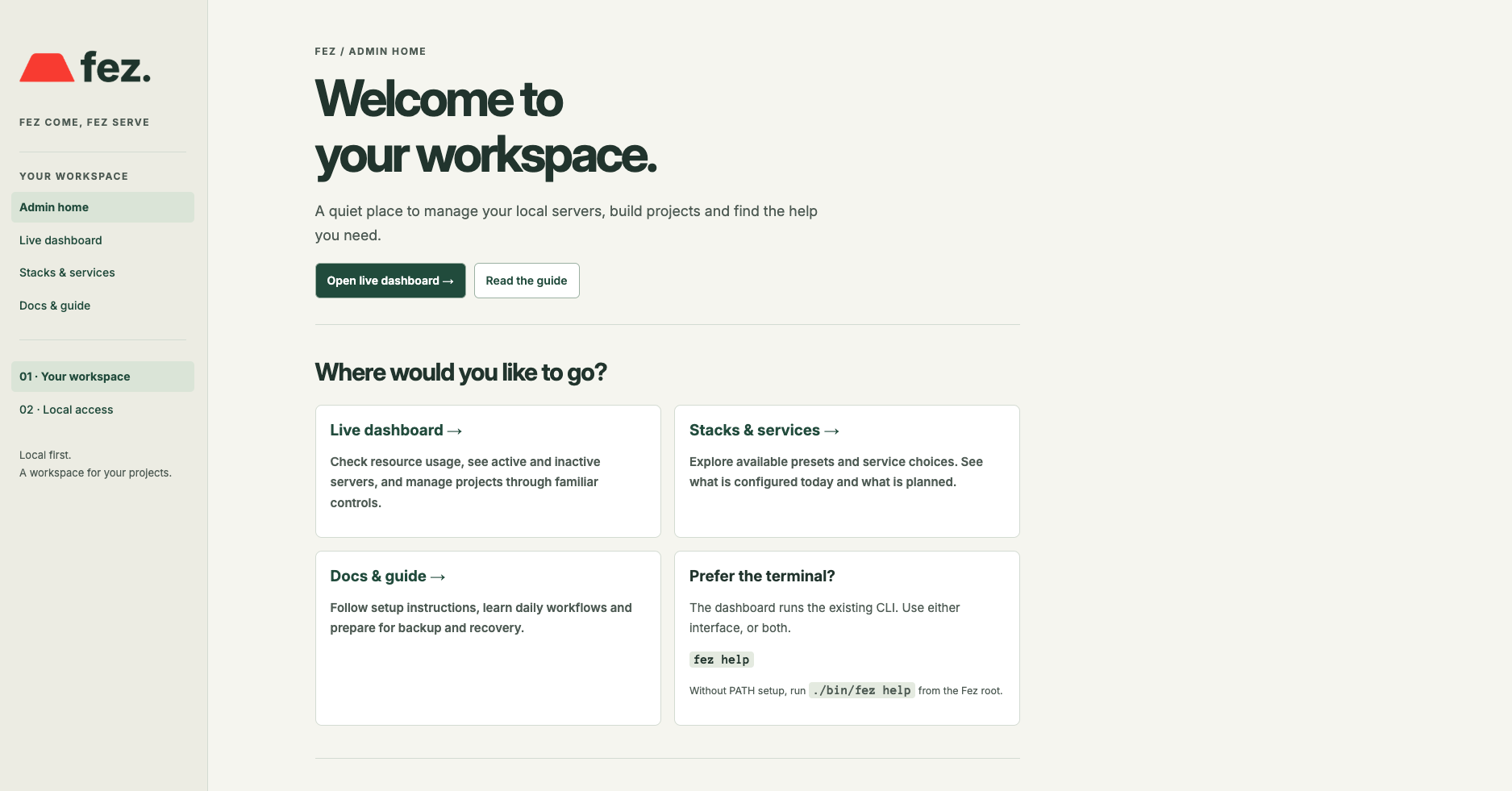
Use the Stacks & services page to explore the catalog, and the live dashboard for stats, servers and projects. Create servers/projects; start, stop, inspect or back them up; and toggle Laravel workers/schedulers. All operations call the existing CLI and run one at a time. DNS/trust changes and destructive commands such as deleting servers/projects remain terminal tasks.
Prefer the terminal? Use this reference for the public fez commands, their arguments and accepted flags. Run ./bin/fez instead of fez if you have not added it to your PATH.
UPPERCASE words are values you supply; square brackets mean optional; ... means more values. Do not type the brackets. Options described as repeatable can be supplied more than once. Commands with “no additional flags” accept only their listed arguments, apart from the help option noted below.
Python-backed commands accept -h or --help after the command, for example fez gateway:setup --help. The shell-handled help, version, doctor and reserved service:remove commands do not accept extra arguments. Workspace selection is handled by the launcher; --root is not a public user option.
help Show the full CLI overview. Aliases: -h, --help.
fez help
No additional flags.
version Show the installed CLI version. Aliases: -v, --version.
fez version
No additional flags.
doctorCheck the local environment file, Docker and Compose availability. For service readiness, use the diagnose commands.
fez doctor
No additional flags.
dashboardStart the local GUI dashboard; Ctrl+C stops it.
fez dashboard [--port PORT]
--port PORT: listening port; default 8099.
config:checkValidate one or more Compose files without starting services. Paths must be inside the Fez workspace.
fez config:check FILE [FILE ...]
No additional flags.
catalog:checkValidate catalog schemas and references.
fez catalog:check
No additional flags.
catalog:listList available services, templates and stack presets, including planned entries. Only configured entries can be installed.
fez catalog:list
No additional flags.
metadata:checkValidate a server or project metadata file.
fez metadata:check server|project FILE [--previous FILE]
--previous FILE: compare with previous metadata, including immutable server identity fields.
For server:plan and server:create, choose one selection mode:
--web apache|nginx: guided selection. --runtime php|python|php+python defaults to php. Repeat --database ENGINE for mysql, mariadb, postgres or mongo; repeat --cache redis for cache selection. These runtime/database/cache flags require --web. --stack ID: a configured preset from catalog:list. --services ID [ID ...]: an explicit service list. --server SERVICE [VERSION]: a web service, optionally with a version. Common flags for both commands:
--os PROFILE: defaults to debian:12, currently the only configured Linux profile. --add SERVICE [VERSION]: add a service; repeat for additional services. --service-version SERVICE=VERSION: override a selected service’s version; repeat for different services. Use latest (the default) or a supported numeric release. Do not specify the same service’s version twice. --env-file FILE: environment file; default .env. --internal-only: do not publish database/cache ports to the host. --port SERVICE=HOST_PORT: host port override; repeat for different services. Choose free ports and compatible services. server:planValidate a server proposal without creating it.
fez server:plan NAME SELECTION [OPTIONS]
Accepts the selection modes and common flags above. A selection mode is required; --yes is not accepted.
server:create Create a named server. Alias: server:new. An interactive terminal can prompt for a preset when selection is omitted.
fez server:create NAME SELECTION [OPTIONS] [--yes]
Accepts all shared selection flags above. --yes confirms the displayed service choices for non-interactive creation.
fez server:plan studio --web apache --runtime php --database mysql --cache redis
fez server:create studio --web apache --runtime php --database mysql --cache redis --yesserver:listList named servers.
fez server:list
No additional flags.
server:infoInspect the named server.
fez server:info NAME
No additional flags.
server:startStart the named server and recover a pending start where supported.
fez server:start NAME
No additional flags.
server:stopStop the server.
fez server:stop NAME
No additional flags.
server:downRemove server containers while retaining data; equivalent to server:delete.
fez server:down NAME
No additional flags.
server:restartRestart the server.
fez server:restart NAME
No additional flags.
server:buildBuild the server images.
fez server:build NAME
No additional flags.
server:deleteRemove server containers while retaining managed data for recovery.
fez server:delete NAME
No additional flags.
server:purgePreview permanent deletion of retained server data. Delete the server’s Docker resources first.
fez server:purge NAME [--confirm NAME]
--confirm NAME: perform the purge; must match the server name. Omitting it only previews.
service:listList the services installed on a server.
fez service:list SERVER
No additional flags.
service:addAdd one or more catalog services to an existing server.
fez service:add SERVER SERVICE [SERVICE ...] [--env-file FILE] [--service-version SERVICE=VERSION]
--env-file FILE: optional environment file. --service-version SERVICE=VERSION: repeatable for different services; existing service versions are immutable.
server:updateApply the service-add/update workflow to an existing server. This does not change versions of already installed services.
fez server:update SERVER [SERVICE ...] [--env-file FILE] [--service-version SERVICE=VERSION]
--env-file FILE: optional environment file. --service-version SERVICE=VERSION: repeatable for different services; existing service versions are immutable.
service:removeReserved; not implemented. Returns unavailable without changing services.
fez service:remove SERVER SERVICE
No additional flags.
gateway:setupCreate or configure the shared local gateway.
fez gateway:setup [--http-port PORT] [--https-port PORT]
--http-port PORT: default 8088. --https-port PORT: default 8443. Choose distinct available ports.
fez gateway:setup --http-port 8088 --https-port 8443gateway:infoInspect the gateway configuration.
fez gateway:info
No additional flags.
gateway:stopStop the shared gateway.
fez gateway:stop
No additional flags.
gateway:recoverRecover an interrupted gateway update.
fez gateway:recover
No additional flags.
gateway:trustInstall trust for the local certificate authority; the operating system may request administrator authorization.
fez gateway:trust
No additional flags.
gateway:dnsPreview or apply managed local hosts entries.
fez gateway:dns [--apply] [--remove] [--project NAME]
--apply: write changes (may require administrator authorization). --remove: remove managed entries instead of adding them. --project NAME: limit to a project. Without --apply, preview only.
route:registerRegister a project route with the shared gateway.
fez route:register PROJECT --server NAME --root-dir PATH [--type TYPE]
Required: --server NAME, --root-dir PATH (project document root, for example projects/apps/hello/public). --type static|php|python: defaults to static.
route:listList gateway routes.
fez route:list
No additional flags.
route:removeRemove the project’s gateway route.
fez route:remove PROJECT
No additional flags.
project:create Create a project. Aliases: project:new, app:new, app:create, site:new, site:create.
fez project:create NAME --type TYPE --server NAME [--group GROUP] [--database ENGINE] [--redis]
--type static|php|laravel|wordpress|python and --server NAME are required outside an interactive terminal; otherwise Fez can prompt. --group apps|sites: defaults to apps, or sites for site aliases. --database mysql|mariadb|postgres: select a compatible installed database. --redis: request Redis support; requires a compatible starter and server.
fez project:create hello --type static --server studio --group sitesproject:listList all projects, or only those on the supplied server.
fez project:list [SERVER]
No additional flags.
project:infoInspect a project.
fez project:info NAME
No additional flags.
project:startStart a project.
fez project:start NAME
No additional flags.
project:stopStop a project, retaining its source and database.
fez project:stop NAME
No additional flags.
project:delete Delete the active project registration while retaining source and database by default. Aliases: app:delete, site:delete.
fez project:delete NAME
No additional flags.
project:purgePreview permanent deletion of retained project data.
fez project:purge NAME [--confirm NAME]
--confirm NAME: perform the purge; must match the project name. Omitting it only previews.
These commands target supported Laravel projects. Workers use the database queue; disabling a worker preserves queued jobs.
worker:enableEnable the project’s queue worker.
fez worker:enable PROJECT
No additional flags.
worker:disableDisable the project’s queue worker.
fez worker:disable PROJECT
No additional flags.
worker:restartRestart the project’s queue worker.
fez worker:restart PROJECT
No additional flags.
worker:statusInspect the status of the project’s queue worker.
fez worker:status PROJECT
No additional flags.
worker:logsShow logs for the project’s queue worker.
fez worker:logs PROJECT
No additional flags.
scheduler:enableEnable the project’s scheduler.
fez scheduler:enable PROJECT
No additional flags.
scheduler:disableDisable the project’s scheduler.
fez scheduler:disable PROJECT
No additional flags.
scheduler:restartRestart the project’s scheduler.
fez scheduler:restart PROJECT
No additional flags.
scheduler:statusInspect the status of the project’s scheduler.
fez scheduler:status PROJECT
No additional flags.
scheduler:logsShow logs for the project’s scheduler.
fez scheduler:logs PROJECT
No additional flags.
server:diagnoseCheck a server’s runtime and services.
fez server:diagnose NAME
No additional flags.
project:diagnoseCheck a project’s runtime and relevant services.
fez project:diagnose NAME
No additional flags.
server:logsRead server logs.
fez server:logs NAME
No additional flags.
project:logsRead project logs.
fez project:logs NAME
No additional flags.
operations:orphansReport orphaned workspace candidates without deleting them.
fez operations:orphans
No additional flags.
Backup engine values: mysql, mariadb, postgres, mongo, redis. BACKUP is a Fez backup directory. Restore into a compatible, unused destination; engine/version checks still apply.
database:backupCreate a logical database backup.
fez database:backup SERVER ENGINE [--database NAME]
--database NAME: required for non-Redis engines. Redis uses its service data rather than a named SQL database.
database:restoreRestore a database backup.
fez database:restore BACKUP --server NAME --engine ENGINE [--database NAME]
Required: --server NAME, --engine ENGINE. --database NAME: target database name for non-Redis engines.
project:backupBack up a project’s source and managed data. Stop the project first.
fez project:backup NAME
No additional flags.
project:restoreRestore a project into a fresh destination.
fez project:restore BACKUP NEW_NAME --server NAME [--group apps|sites]
Required: --server NAME. --group apps|sites: defaults to apps.
backup:checkValidate backup integrity before a restore.
fez backup:check BACKUP
No additional flags.
server:upgrade-planPrepare an upgrade plan; does not execute an upgrade.
fez server:upgrade-plan NAME ENGINE --image IMAGE@sha256:DIGEST
Required: --image IMAGE@sha256:DIGEST, an image pinned by digest. ENGINE uses the backup engine values above.
hosting:checkCompare a project’s requirements with a target capability profile. This does not deploy or certify production readiness.
fez hosting:check PROFILE --project PROJECT
Required: --project PROJECT. PROFILE is a target profile JSON file.
Names are at most 63 characters: lowercase letters and digits separated by hyphens; server names also allow underscores, and project names allow dots. Use fez help to compare this reference with your installed CLI.
The current focus is extensive local use. Fez can compare a project's needs with a declared shared-host or Docker VPS profile, but that comparison does not deploy anything or certify production readiness.
hosting/profiles/ into private var/hosting/targets/. fez hosting:check var/hosting/targets/my-host.json --project helloResults should return 'incomplete', 'incompatible' or 'declared-match'. Even a declared match leaves production readiness unverified. CPU, RAM and disk declarations are descriptive; they do not enforce local resource limits. Model service choices locally when creating a new server.